CS/Lecture Note
[OSS] Python
Uykm
2023. 11. 12. 22:27
▼ Python: Basic & Intermediate
Python
- Interpreted, high-level, general-purpose programming language
(+) Dynamically-typed ➜ Run-time에 타입이 결정된다. 즉, 타입을 미리 정의해줄 필요 X
(+) garbage-collected ➜ 메모리 관리를 알아서 해준다.
(+) batteries-included ➜ 웬만한 필요한 라이브러리들이 다 있다. - "Design philosophy"➜ Code readability, 코드가 간결하고 가독성이 좋아야 한다 !
➜ '하위 호완성(backward-compaitble)' 을 잘 지원 X
( 그래서, 파이썬은 v3.0을 써야한다. )
➜ Python은 '실용적인' 프로그래밍 언어 ! - Interpreted language (⭤ Compiled language)
➜ step-by-step으로 '인터프리터(interpreter)' 가 소스코드를 바로 실행한다.
ex) Python, Java Script, R, PHP, ... - 파이썬 프로그래밍을 더 잘하기 위한 방법 (교수님 Comments)
- 파이썬의 장점을 활용하자 ! (a.k.a. Pythonic)
ex) Swap using unpacking
temp = a
a = b vs. (a, b) = (b, a)
b = temp
➜ "Pythonic" 하게 짜도록 도와주는 코드 스타일이나 가이드들이 많다. - 이미 있는 라이브러리를 최대한 활용하자 ! (a.k.a Don't reinvent the wheel)
➜ 그 중 유용한 라이브러리가 있다면 그 라이브러리 활용하는 연습 !
- 하지만, 라이브러리가 너무 많기 때문에, 구글이나 깃허브에 특정 키워드를 검색해서 찾아보자.
➜ 널리 알려진 것을 선택하거나 내가 해결해야 하는 문제를 '구글' 에 검색 !
- 하지만, 라이브러리가 너무 많기 때문에, 구글이나 깃허브에 특정 키워드를 검색해서 찾아보자.
- 파이썬의 장점을 활용하자 ! (a.k.a. Pythonic)
Data Types
- 문자열(String)은 'built-in' 타입이다. (라이브러리 X)
print('Hello, World!')
print(3.29)

# Numbers ------------------------------

# int : Integers with an unlimited range
a = 329				# Decimal number
b = 0b1010010001	# Binary number
c = 0o511			# Octal number
d = 0x149			# Hexadecimal number

# float : Double-precision(64bit) floating-point numbers
# Note) 파이썬은 single-precision(32bit)를 자체적으로 지원 X
a = 3.	# a = 3.0

# complex
a = 3.29 + 8.2j

# Built-in constants: False, True, None, ...
a = False	# bool
b = (3 == 3.)	# True
None == False	# False (같은 것은 X)
type(None)		# NoneType


# String ---------------------------------

name = 'Mkyu'
name = "Mkyu"

name = 'Mkyu\nShin' # Multi-line
name = """Myku	# block comment로 사용
Shin"""

dict = {'name': 'Shin', 'room_no': 327, 2023: True}

# String formatting : % operator (~ printf)
'My name is %s and my room is %d' % ('Shin', 327)
'My name is %s and my room is %d' % (name, room_no + 1)	# need to print the next room
'My name is %s and my room is %d' % ['Shin', 327]	# Error: List를 한 덩어리로 간주.
'My name is %(name)s and my room is %(room_no)04d' % dict	# 327 -> 0327

# String formatting : str.format function (~ std::cout)
'My name is {} and my room is {}'.format('Shin', 327)
'My name is {1} and my room is {0}'.format(327, 'Shin')
'My name is {name} and my room is {room_no}'.format(name='Shin', room_no=327)
'My name is {name} and my room is {room_no}'.format('Shin', 327)	# Error!
'My name is {name} and my room is {room_no:04d}'.format(name, room_no)
'My name is {name} and my room is {room_no:04d}'.format(**dict)		# 327 -> 0327

# String formatting : + operator
'My name is ' + name + ' and my next room is ' + str(room_no + 1)

# String formatting : f-string (% 장점과 + 장점)
f'My name is {name} and my next room is {room_no + 1}'
f'My name is {name} and my next room is {room_no + 1:04d}'

# String trimming
full_name = '\t Mkyu Shin \n'
full_name.strip()	# 'Mkyu Shin'
full_name.strip('\t\n')	# ' Mkyu Shin '
full_name.lstrip()	# 'Mkyu Shin \n'
full_name.rstrip()	# '\t Mkyu Shin'

# String splitting
stud = 'Mkyu, 327, 1'
stud.split(',') # ['Mkyu', ' 327', ' 1']
stud.split(', ') # ['Mkyu', '327', '1']
stud.split('|') # ['Mkyu, 327, 1']
strings = stud.partition(', ')	# 최초로 ', ' 와 일치하는 문자열을 기준으로 쪼갠다.
# tuple : (일치 전 문자열, 일치 문자열, 일치 후 문자열)
print(strings)	# ('Mkyu', ', ', '327, 1’)

# String splitting (개행 문자 '\n' 포함)
studs = 'Mkyu, 327, 1\nKang, 328, 1'
studs.split(', ')
strings = studs.split(', ')
print(strings)	# ['Mkyu', '327', '1\nKang', '328', '1']
studs.splitlines() # ['Mkyu, 327, 1', 'Kang, 328, 1']

# String matching & searching
studs = [
	'My name is Shin and my E-mail is digi1k2001@gmail.com.',
	'My name is Uijin and my e-mail address is uijin0531@gmail.com.'
]
for line in profs:
print('e-mail' == line)			# False False	Note) Matching
print('e-mail' in line) 		# False True	Note) Searching
print('e-mail' in line.lower()) # True True		Note) upper() - 대문자로 변경
print(line.find('e-mail')) 		# -1 24 		Note) Starting index
print(line.endswith('.')) 		# True True		Note) startswith()


------------------------------------------

# Type check
type(name) == str

# Type casting
int(3.29) == 3
str(3) == '3'
int('29') == 29

# Length of compound data
len(name) == 4	# 요소(item)의 개수
Compound data (~ Array)
- 데이터 타입이 혼합되어도 괜찮다.
➜ heterogenous(이질), homogeneous(동일) data type
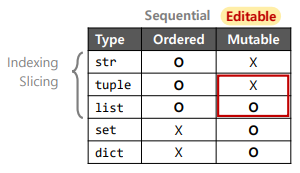
튜플(tuple)은 'concatenation' 이나 'appending'이 안된다 ! - "in-place methods" : 새로운 compound data를 만들지 않고 기존의 것을 수정 !
- 튜플 vs. 리스트
➜ "Paking" and "Unpaking" ( '튜플' 은 불가능 )
➜ 'Multiple return values' 의 경우도 사실 여러 데이터를 '튜플' 에 담아 보내는 것이다 !

# tuple
tuple = ('Mkyu', 327, True)	# tuple = 'Mkyu', 327, True

# list
list = ['Mkyu', 327, True]

# set (A unorederd set of unique arbitary objects)
set = {'Mkyu', 327, True}
set == {'Mkyu', 327, True, True}	# True : 중복 제거
set == {'Mkyu', True, 327}	# True

dict = {'name': 'Mkyu', 'room_no': 327, 2021: True}

# Indexing
tuple[0] == 'Mkyu'
list[-1] == True # == list[2] - Reverse indexing (Pythonic
set[0]	# Error!
dict['name'] == 'Mkyu'
dict[2021] == True

# Slicing - String 말고도 모든 Compound data에 사용 가능
str = 'Mkyu'
str[1:3] == 'ky'	# 인덱스 1부터 2까지 자름
str[1:] == 'kyu'	# 인덱스 1부터 끝까지 자름
str[:] == 'Mkyu' 	# 전체를 가져옴
str[:4:2] == 'My'	# 인덱스 0부터 2씩 증가시키면서 인덱스 4까지 가져옴
str[1::2] == 'ku'	# 인덱스 1부터 2씩 증가시키면서 끝까지 가져옴
list[::-1] == [True, 327, 'Mkyu']	# 인덱스를 -1씩 감소시키면서 전체를 가져옴

# Concatenation - 두 개의 compound data를 합치는 것
# 새로운 Compound data를 만든다.
new_str = str + ' Shin'
new_list = list + ['Mirae Hall', 'SeoulTech']
# 기존의 Compund data를 변경 - "in-place methods"
set.union({'Mirae Hall', 'SeoulTech'})	# set = {'Mkyu', 327, True, 'Mirae Hall', 'SeoulTech'}
dict.update({'room_no': 109, 'building': 'Mirae Hall', 'school': 'SeoulTech'})

# Appending - 하나의 compound data에 하나의 item을 추가
list.append('Mirae Hall')
set.add('Mirae Hall')
dict['building'] = 'Mirae Hall'
Operators
- 연산자 우선순위(precedence)
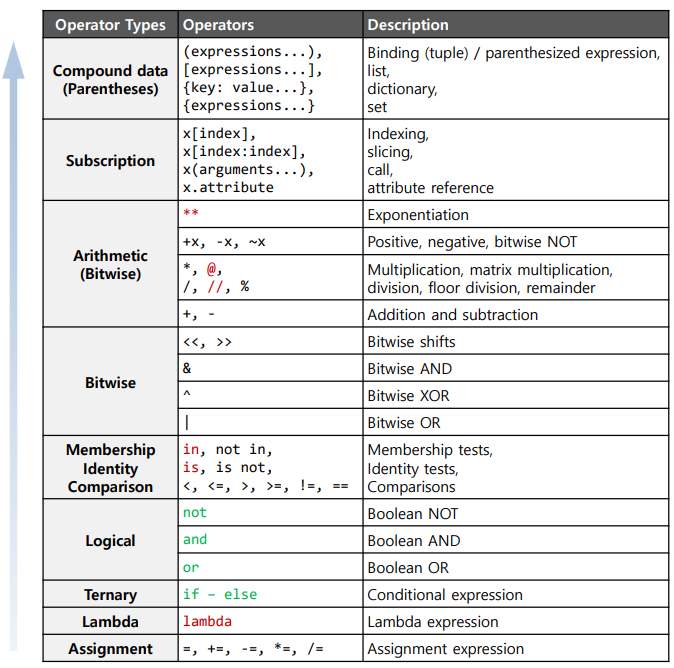
- Operators
➜ 직관적(More natural) !
# Arithmetic operators
type(4/2) == float	# int 타입끼리 연산해도 항상 'float' 타입이다. (int 타입 X)
(7.5 % 2) == 1.5	# Modulo (remainder)
(7.5 // 2) == 3 	# Floor division (integer division; 'int' 타입)
(-7.5 // 2) == -4
(2 ** 4) == 16		# Exponentiation

# Logical operators
not 3.29 > 3 and 10.18 < 10 or 5.12 > 5
(not 3.29 > 3) and (10.18 < 10 or 5.12 > 5)	# 두 개의 결과 체크

# Ternary operators (삼항 연산자)
is_odd = True if x & 2 == 1 else False	# In Python
is_odd = (x % 2) == 1 ? 1 : 0;			# In C/C++

# Lambda expression (람다 함수) : A short function (as a variable)
is_odd = lambda x: True if x % 2 == 1 else False
is_odd(3)	# True

# Lambda expression - Sorting
data = [3, 2, 9]
# list.sort() : An 'in-place' function
data.sort()							# data = [3, 2, 9]
data.sort(reverse=True)				# data = [9, 3, 2]
data.sort(key=lambda x: abs(x - 4))	# data = [3, 2, 9], 4와의 거리를 기준으로 정렬
# sorted() : Returning a 'new' list, 리스트 말고도 다양한 타입들을 정렬 가능
sorted(data)						# data = [3, 2, 9]
sorted(data, reverse=True)			# data = [9, 3, 2]
sorted(data, key=lambda x: abs(x-4)	# data = [3, 2, 9]
pts = [(3, 29), (10, 18), (10, 27), (5, 12)]
nearest_pts = sorted(pts, key=lambda pt: pt[0]**2 + pt{1}**2)	# 원점과의 거리를 기준으로 정렬
- List comprehensions (중요)
➜ 반복되거나 특정조건을 만족하는 리스트를 쉽게 만들어내기 위한 방법 !
ex) [0^2, 1^2, ... , 8^2, 9^2]
[(변수에 실제로 할당될 값) for (사용할 변수명) in (순회할 수 있는 값; range, tuple, list, dict, etc.)]# C-style codes
squares = []
for x in range(10):
squares.append(x**2)
# map funcion (Note) filter, reduce)
squares = list(map(lambda x: x**2, range(10)))
# List comprehension
squares = [x**2 for x in range(10)]
- Identity operator
# Equality (value) vs. identity(~ address)
x = 2021
y = 2020 + 1
x == y	# True	Note) print(x, y)
x is y	# False	Note) print(id(x), id(y))
- Membership operator (~ string search)
1 in [0, 1, 2, 3, 4]	# True
5 not in range(5)		# True : [0, 4) (ex) range(1, 5) -> 1, 2, 3, 4
1 not in range(0, 4, 2)	# True : 0, 2, 4 -> range(start, end + 1, step)
'name' in {'name': 'Shin', 'room_no': 327, 2023: True}	# True
Flow Control
- Condition: if,
switch - Loop: for, while - break, continue, else
- No action: pass ( ; 혹은 { } )
# Factorial
n = 7
f = 1
if n < 0:
	pass
elif n == 0:
	pass
else:
	while n > 0:
    	f = f * n
        n = n - 1

# Prime number
n = 7
for x in range(2, n):
	if n % x == 0:
    	print(n, 'equals', x, '*', n//x)
        break
else:	# for문에도 else가 붙을 수 있다.
    print(n, 'is a prime number')

# Loop: for statements with sequential data (string, list, tuple, ...)
year_list = [2001, 2002, 2003, 2023]
for idx in range(len(year_list)):		# Loop with indices
	print(idx)
for item in year_list:					# Loop with items
	print(item)
for idx, item in enumerate(year_list):	# Loop with indices and items
	print(idx, item)

# Loop: merge sequential compound data using zip.
year_set = {2000, 2001, 2005, 2023}
month_list = ['May', 'October', 'December', 'November']
for idx in range(len(year_list)):				# Loop with indices
	print(year_list[idx], month_list[idx])
for idx, year in enumerate(year_list):			# Loop with indices and items
	print(year, month_list[idx])
for year, month in zip(year_list, month_list):	# Loop with items
	print(year, month)

# Loop: for statements with set-type data
year_set = {2000, 2001, 2005, 2023}
for item in year_set:
	print(item)
for num, item in enumerate(year_set):
	print(num, item)	# 'num' is not a index.

# Loop: for statements with dictionary-type data
year_dict = {'J': 2000, 'S': 2001, 'W': 2005, 'Y': 2023}
for key in year_dict:
	print(key)
for key in year_dict.keys():
	print(key)
for value in year_dict.values():
	print(value)
for pair in year_dict.items():
	print(pair)
''' 튜플(tuple)로 반환
('J', 2000)
('S', 2001)
('W', 2005)
('Y', 2023)
'''
for key, value in year_dict.items():
	print(key, value)
'''
J 2000
S 2001
W 2005
Y 2023
'''
- if statements - Falsy or Trusy values
'''
range(0) -> False : 숫자를 생성하지 않는 빈 범위.
(None) -> False : 비어있는 튜플(tuple) -> ()로 간주.
(None, ) -> True : 비어있지 않은 튜플(tuple) -> 하나의 요소 'None'을 포함하고 있는 튜플로 간주.
[None] -> True
{None} -> True
'''
values = [False, 0, 0., None, '', (), [], {}, range(0), (None), (None,), [None], {None}]
	for val in values:
if val:
	print(f'{val} is True.')
else:
	print(f'{val} is False.')	# f-string
Function Defination
- 다수의 데이터를 반환 가능 - Multiple return values (as a tuple)
- 오버로딩(Overloading)을 지원하지 않는다 !
- Argument passing
➜ Positional or Keyword arguments, 튜플(tuple), 딕셔너리(Dictionary)
# for문
def factorial_for(n):
	f = 1
    for m in range(1, n + 1):
    	f *= m
    return f


# 재귀
def factorial_rec(n = 1):	# 디폴드 인자 값
	if n <= 0:
    	return 1
    else:
    	return n * factorial_rec(n - 1)

factorial_for(10)
factorial_rec(10)
factorial_for()	# Error! Default argument value가 없기 때문에!
factorial_rec()	# 1


# Multiple return values (as a tuple)
def mean_var(data):
    n = len(data)
    if n > 0:
        mean = sum(data) / n

        sum2 = 0
        for datum in data:
            sum2 += datum**2
        # sum2 = sum([datum**2 for datum in data])
        var = sum2 / n - mean**2
        return mean, var
    # 위, 아래에 있는 return 타입이 달라도 상관 X
    # 0을 return하면 오해할 수도 있기 때문에 "없다."를 의미하는 None 반환
    return None, None

data = [3, 2, 9, 1, 0, 8, 7, 5]
pair = mean_var(data)    # pair = (4.375, 9.984)
mean, var = mean_var(data)  # mean = 4.375, var = 9.984
mean, _ = mean_var(data)    # Get only the first one
mean = mean_var(data)[0]    # Get only the first one

# Various argument passing
def range2(end, start=0, step=1):
	if start > end:
    	(start, end) = (end, start)
	return list(range(start, end, step))
print(range2(10)) 					# [0, 1, 2, 3, 4, 5, 6, 7, 8, 9]
print(range2(1, 10)) 				# [1, 2, 3, 4, 5, 6, 7, 8, 9]
print(range2(1, 10, 2)) 			# [1, 3, 5, 7, 9]
print(range2(10, step=2)) 			# range2(10, 0, 2) -> [0, 2, 4, 6, 8]
# 'end'처럼 디폴트값이 없는 경우 'Positional arguments' 매칭
# 혹은 'Keyword arguments' 매칭이 이뤄져야 한다.
print(range2(step=2, 10)) 			# Error!
print(range2(step=2, end=10)) 		# OK : [0, 2, 4, 6, 8]
print(range2(10, step=2, start=1)) 	# [1, 3, 5, 7, 9]
print(range2(10, 2, start=1)) 		# Check the result
arg_tuple = (1, 10, 2)
# Sequence unpacking
print(range2(*arg_tuple)) 			# [1, 3, 5, 7, 9]
arg_dict = {'end': 10, 'step': 2, 'start': 1}
# Dictionary unpacking
print(range2(**arg_dict)) 			# [1, 3, 5, 7, 9]
Class definition & Object instantiation
- 파이썬은 첫 번째 인자로 항상 인스턴스(self)가 전달된다 !
➜ 메서드에서 인자를 추가로 받고 싶다면, 아래처럼 생성해줘야 한다.
➜ method(self, parameter1, parameter2, ...) - 멤버 변수 (Member value)
➜ self.valriableName
from random import randint

class Dice:
    def throw(self):	# 무조건 self를 인자로 넣어줘야 한다.
        return randint(1, 6)

dice = Dice()
print(dice.throw()) # [1, 6]

# Class inheritance(상속) & Function overrding
class Coin(Dice):
	def throw(self):
    	return super().throw() % 2

coin = Coin()
print(coin.throw())	# 0 or 1

# Constructor -------------------------------------
from random import randint

class Dice:
    def __init__(self, boundary=(1, 6)):
      # Private member definition
      # self.__start = min(boundary)
      # self.__start = max(boundary)
        self.start = min(boundary)  # 1
        self.end = max(boundary)    # 6

    def throw(self):
        return randint(self.start, self.end)

dice = Dice()
print(dice.throw()) # [1, 6]

coin = Dice((0, 1))
print(coin.throw())	# 0 or 1

# Access private member
print(dice.__start, dice__end)				# Error!
print(dice._Dice__start, dice._Dice__end)	# 1 6
File Input and Output
# Read a text file using read()
f = open('data/class_score_kr.csv', 'r')
lines = f.read() # Read all lines together
print(lines)
f.close()

# Read a text file using readline()
f = open('data/class_score_kr.csv', 'r')
while True:
	line = f.readline() # Read a line sequentially
	if not line:
		break
	print(line)
f.close()

# Read a text file using readlines()
with open('data/class_score_kr.csv', 'r') as f:	# f를 close 해줄 필요 X -> 자동 소멸 !
for line in f.readlines(): # Read all lines as a list
print(line.strip())

# Write a text file using write()
with open('data/class_score_kr.csv', 'r') as fi, open('class_score_mean.csv', 'w') as fo:
	for line in fi.readlines():
		values = [int(word) for word in line.split(',')]
		mean = sum(values) / len(values)
	for val in values:
		fo.write(f'{val}, ')
	fo.write(f'{mean}\n')
Exception Handling
- 'data/class_score.csv' (which does not exist)
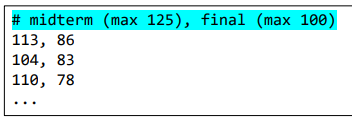
➜ FileNotFoundErrror: [Errno 2] No such file or directory: … - 'data/class_score_en.csv' (which contains the header)
➜ ValueError: invalid literal for int() with based 10: …
# ValueError 해결
with open('data/class_score_en.csv', 'r') as fi, \ # 긴 코드를 끊어줄 때 '\' 사용
	open('class_score_mean.csv', 'w') as fo:
	for line in fi.readlines():
		try:
			values = [int(word) for word in line.split(',')]
			mean = sum(values) / len(values)
			for val in values:
				fo.write(f'{val}, ')
			fo.write(f'{mean}\n')
		except ValueError as ex:
			print(f'A line is ignored. (message: {ex})')

# 파일을 열면서 발생하는 에러도 잡고 싶을 때(FileNotFoundError)
try:
	with open('data/class_score.csv', 'r') as fi, \
		open('class_score_mean.csv', 'w') as fo:
		for line in fi.readlines():
			try:
				values = [int(word) for word in line.split(',')]
				mean = sum(values) / len(values)
				for val in values:
					fo.write(f'{val}, ')
				fo.write(f'{mean}\n')
			except ValueError as ex:
				print(f'A line is ignored. (message: {ex})')
except Exception as ex:
	print(f'Cannot run the program. (message: {ex})')
Package Import
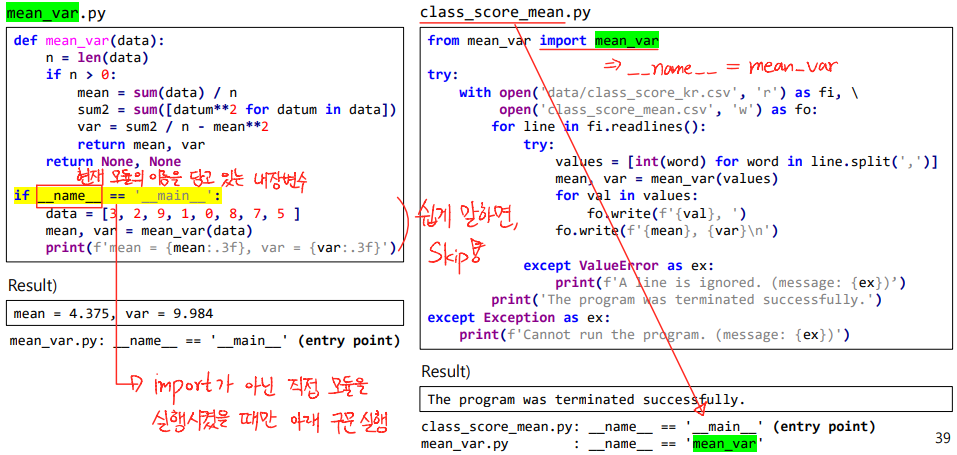
- import 할 때 주의할 점 !
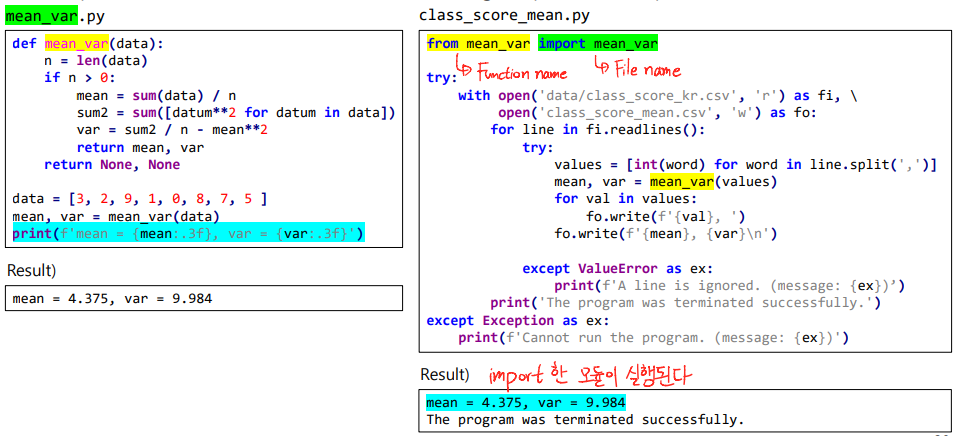
▼ Python: Standard Library
Python standard library 설치
- Shell/Anaconda Prompt: pip install package_name
- IPython console (in Spyder): !pip install package_name
➜ 설치됐는지 확인하고 싶으면 직접 import 해보자 !
math
- 상수(Constants): pi(3.14..), e(2.719..; 자연상수), inf(양의 무한대), nan(부동 소수점으로 숫자가 아닌 값)
- sqrt(x) : x의 제곱근
- log(x[, base]): logbase(x), log2(x), log10(x)
- ceil(x) : 올림
- prod(iterable, *, start=1): 주어진 iterable에 대해서 모두 곱한 값을 반환
- sin(x), cos(x), tan(x), ...,
atan(x): 두 점 사이의 tan 값을 받아 절대각을 -π/2 ~ π/2의 라디안 값으로 반환,
atan2(y, x): 두 점 사이의 상대좌표(x, y)를 받아 절대각을 -π ~ π의 라디안 값으로 반환. - degrees(x), radians(x)
- isinf(x), isnan(x), isfinite(x)
decimal
- Decimal: decimal 부동 소수점을 위한 클래스
- Decimal.round(): 소수나 정수를 짝수로 반올림.
- Decimal.quantize(exp, rounding=None, context=None): 소수나 정수를 임의의 자릿수로 반올림하고 짝수로 반올림.
print(round(3.5)) # 4
print(round(4.5)) # 4 (not 5)
random
- random(): 부동 소수점을 랜덤으로 반환. [0.0, 1.0)
- randint(a, b): 정수 N(a <= N <= b)을 랜덤으로 반환.
- uniform(a, b): 부동 소수점 N(a <= N <= b)을 랜덤으로 반환.
- gauss(mu, sigma), normalvariate(mu, sigma): mu는 평균, sigma는 표준편차.
- seed(a=None, version=2): 난수 생성기를 초기화시킨다.
import random
round2 = lambda x: int(x + 0.5)
print([round2(random.uniform(0, 10)) for i in range(10)]) 	# [2, 7, 6, 0, 3, 5, 3, 5, 7, 1]
print([round2(random.gauss(5, 1)) for i in range(10)]) 		# [5, 6, 6, 3, 5, 5, 5, 5, 7, 6]
time
- 알고리즘 성능을 테스트할 때 자주 사용.
- asctime([tm_struct]), ctime([secs]): 문자열(string)으로 표현해준다.
import time
print(time.time()) # 1632946803.815631
print(time.process_time()) # 4.59375, 현재 프로세스가 생성된 후의 시간 (except sleep; CPU를 사용할 때만)
print(time.thread_time()) # 3.890625, 현재 쓰레드가 생성된 후의 시간 (except sleep; CPU를 사용할 때만)
print(time.localtime()) # time.struct_time(..., tm_mday=30, tm_hour=5, ...), UTC 기준
print(time.gmtime()) # time.struct_time(..., tm_mday=29, tm_hour=20, ...), local time zone 기준
print(time.ctime()) # Thu Sep 30 05:20:03 2021
start = time.time()
time.sleep(2)	# 현재 작업하고 있는 쓰레드를 2초동안 정지시킨다.
elapse = time.time() - start # 2.0132129000012355
print(elapse)
glob
- Wildcards와 같은 특정 패턴에 매칭되는 파일이나 디렉토리들을 찾아서 반환한다.

import glob # from glob import glob
glob.glob('*.py') # glob('*.py') : 스켈레톤 코드들이 나타남
glob.glob('data/class_score_??.csv') # glob('data/class_score_??.csv')
fnmatch
- 특정 패턴에 매칭되는 모든 문자열(string)을 찾는다.
import fnmatch
studs = ['My name is Shin and my E-mail is digi1k2001@gmail.com.',
	'My name is Uijin and my e-mail address is uijin0531@gmail.com.']

# For a single string -> fnmatch(text, pattern)
print([fnmatch.fnmatch(studs, 'e-mail') for prof in profs]) # [False, False]
print([fnmatch.fnmatch(studs, '*e-mail*') for prof in profs]) # [True, True]

# case-sensitive(대소문자 구분 X) -> fnmatchcase(text, pattern)
print([fnmatch.fnmatchcase(stud, '*e-mail*') for stud in studs]) # [False, True]
print([fnmatch.fnmatchcase(stud, '*[Ee]-mail*') for stud in studs]) # [True, True]

# For a list of strings -> filter(iterable, pattern) : 리스트의 iterable 요소를 반환.
print(fnmatch.filter(studs, '*e-mail*')) # ['My ... Shin ...', 'My ...Ujiin ...']
print(fnmatch.filter(studs, '*Sh?i*'))	# ['My ... Shin ...']
csv
- reader(file_obj(오픈한 파일), dialect= 'excel', **fmtparams)
- writer(file_obj(오픈한 파일), dialect= 'excel', **fmtparams)
import glob, csv

files = glob.glob('data/class_score_??.csv')
all_data = []
for file in files:
	with open(file, 'r') as f: 		# Construct a file object
		csv_reader = csv.reader(f) 	# Construct a CSV reader object
		data = []
		for line in csv_reader: # e.g. line = ['113', '86']
			if line and not line[0].strip().startswith('#'): 	# If 'line' is valid && not a header
				data.append([int(val) for val in line]) 		# Append 'line' to 'data' as numbers
		all_data = all_data + data 								# Merge 'data' to 'all_data'
pickle
- 데이터들(Python object)을 하나의 string으로 '직렬화(Serialization)' 할 수 있는 binary protocol을 제공한다.
# Writing data to a file
import pickle
with open('class_score_all.pickle', 'wb') as f:
	pickle.dump((files, all_data), f)	# 읽어온 f를 '(files(파일명), all_data)' 형태로 저장

# Loading data from the file
import pickle
with open('class_score_all.pickle', 'rb') as f:
	_, data = pickle.load(f)	# picle.load는 두 개의 값이 있는 튜플을 반환.
	print(data)
tkinter
- 파이썬의 GUI toolkit이다.
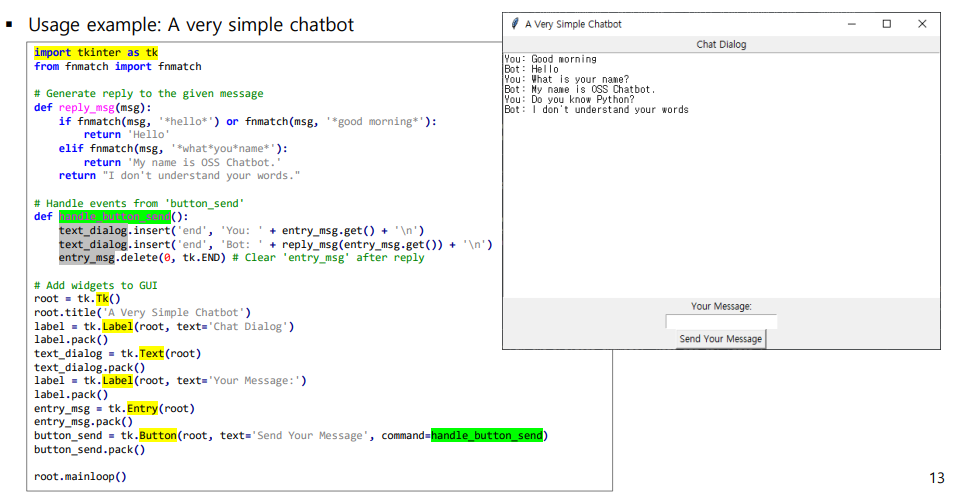
- 위의 코드를 'refactoring' 한 코드
import tkinter as tk
from fnmatch import fnmatch
class ChatBot:
	def __init__(self):
		self.talk_table = [
			('*hello*', 'Hello'),
			('*good morning*', 'Hello'),
			('*what*you*name*', 'My name is OSS Chatbot.'),
		]
		self.talk_unknown = "I don't understand your words."

	def reply(self, msg):
		for pattern, response in self.talk_table:
			if fnmatch(msg, pattern):
				return response
		return self.talk_unknown

class SimpleChatBotGUI:
	def __init__(self, chatbot, master):
		self.chatbot = chatbot
		self.master = master
		self.master.title('A Very Simple Chatbot')
		self.label = tk.Label(master, text='Chat Dialog')
		self.label.pack()
		self.text_dialog = tk.Text(master)
		self.text_dialog.pack()
		self.label = tk.Label(master, text='Your Message:')
		self.label.pack()
		self.entry_msg = tk.Entry(master)
		self.entry_msg.pack()
		self.button_send = tk.Button(master, text='Send Your Message',
									command=self.handle_button)
		self.button_send.pack()

	def handle_button(self):
		msg = self.entry_msg.get()
		self.text_dialog.insert('end', 'You: ' + msg + '\n')
		self.text_dialog.insert('end', 'Bot: ' + self.chatbot.reply(msg) + '\n')
		self.entry_msg.delete(0, tk.END) # Clear 'entry_msg' after reply

if __name__ == '__main__':
	chatbot = ChatBot()
	root = tk.Tk()
	app = SimpleChatBotGUI(chatbot, root)
	root.mainloop()
tqdm
- 루프가 얼마나 진행되었는지 'Progress bar' 를 통해 시각화해준다.
- 순회 가능한(iterable) 객체를 첫 번째 parameter로 넣어주고 for문에 삽입해주면 된다.
# 일반적인 경우
n = 10000
for i in range(n):
	pass 								# Do something
	print(f'{i} / {n} ({100*i//n}%)') 	# Print progress
# ...
# 9998 / 10000 (100%)
# 9999 / 10000 (100%)

# tqdm을 사용하는 경우
from tqdm import tqdm
n = 10000
for i in tqdm(range(n)):
	pass 	# Do something

# 76%|████████████████████████████ | 7568/10000 [00:33<00:10, 229.00it/s]